
Automation tools compared
n8n Alternatives: n8n vs Zapier vs Make, and How Each One Charges
The two best known n8n alternatives are Zapier and Make. All three connect your apps and automate work without much code. The biggest practical difference is how they count usage: n8n charges per workflow run, Zapier per action, which it calls a task, and Make per module action, which it calls a credit. That one difference can change your monthly bill a lot as workflows grow.

On this page
We build automations and AI agents for businesses, including fintech, gaming, ecommerce and subscription apps, so we've used all three.
How each tool counts usage
These definitions come from each company's own pricing page: n8n pricing, Zapier pricing and Make pricing, checked in November 2026.
| n8n | Zapier | Make | |
|---|---|---|---|
| Billing unit | Workflow execution | Task | Credit |
| What counts | One full run of a workflow, however many steps it has | Each successful action in a Zap, while triggers don't count | Each module action, and most use 1 credit |
| Free option | A self hosted version on GitHub, and a trial of the hosted plans | A free plan with 100 tasks a month | A free plan with 1,000 credits a month |
| Steps that are free | Not relevant, because you pay per run | Filter, Formatter, Paths, Delay and some other built in steps | Router and error handler modules |
Swipe the table sideways to see every column.
A worked example
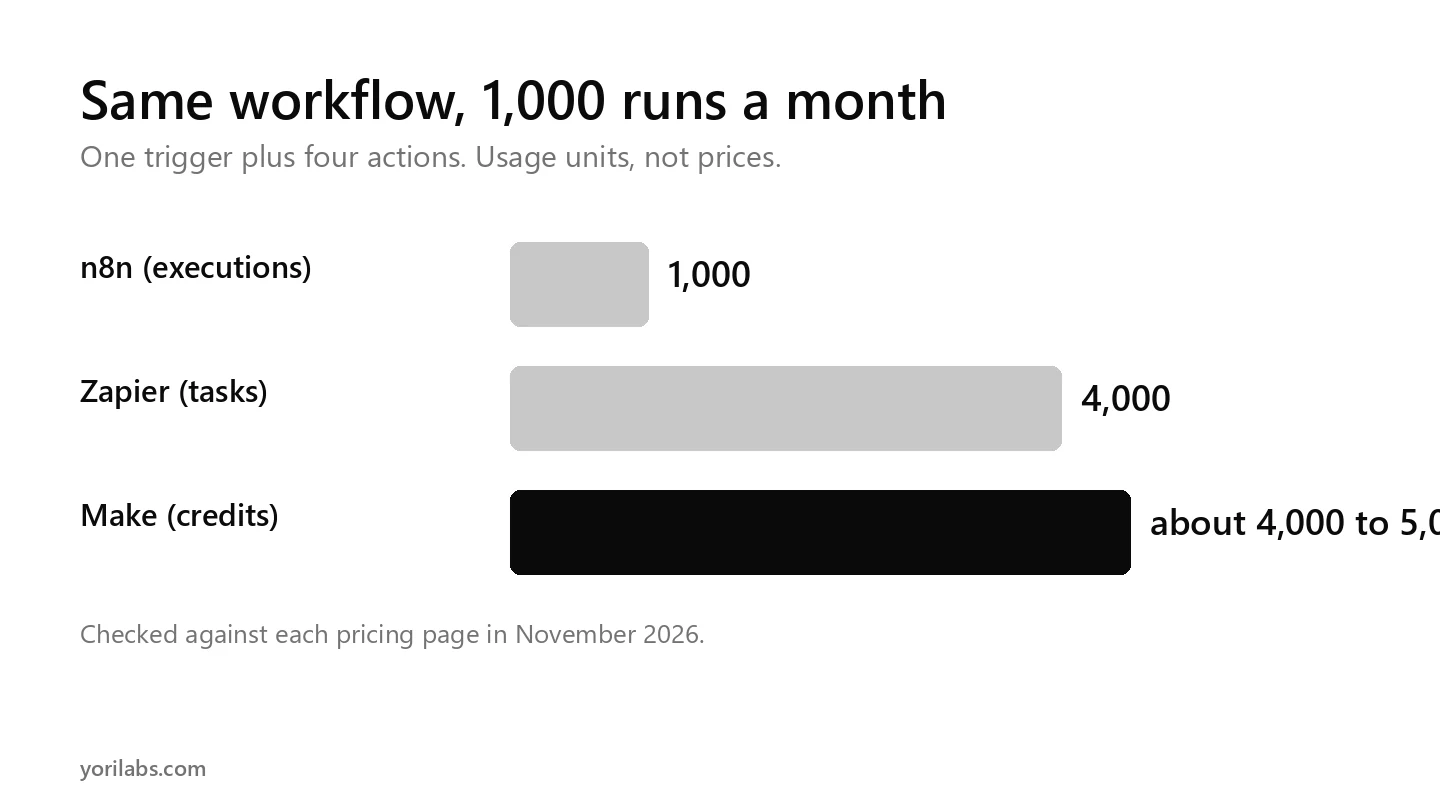
Say you have a workflow that runs 1,000 times a month. A new lead arrives from a form, which is the trigger, and then four actions happen: save it to a sheet, add it to your CRM, send a WhatsApp alert and email the salesperson.
- n8n: 1,000 executions. Each full run counts once, however many steps it has.
- Zapier: 4,000 tasks, which is 4 actions times 1,000 runs. The trigger is free.
- Make: roughly 4,000 to 5,000 credits, depending on how many modules your scenario uses and whether the trigger module counts.
This compares usage units, not prices. Plan prices change often, so check each pricing page for current rates in your currency.
The longer your workflows, the more n8n's per run model tends to help. For short, simple automations the difference is small, and ease of use may matter more.
n8n vs Zapier: which should you use?
Choose Zapier if your team is non technical and wants the simplest setup, your workflows are short, with a trigger plus one or two actions, or you need a specific app integration that's easiest there.
Choose n8n if your workflows have many steps or run very often, you want the option to self host so data stays on your own server, and you have someone technical enough to handle setup, updates and security.
Choose Make if you want a visual, flowchart style builder with branching and routers, and your team is comfortable with a bit more complexity than Zapier.
n8n alternatives for AI agents
All three now offer AI steps inside workflows, such as calling an AI model, classifying messages or drafting replies. That makes them popular no code AI agent platforms for small teams.
The usage rules above still apply. An AI step is another action, task or credit, and AI model costs may be billed separately, so check how each tool counts AI usage before you scale. Our explainer on AI agent vs agentic AI covers when one step becomes a whole agent.
A simple way to start: one workflow, one job. For example, a new lead arrives, AI qualifies it, and it's routed to the right salesperson on WhatsApp. Measure how much time it saves before you build the next one. Our guide to AI automation has more starter ideas.
Self hosting n8n: what to know
The free self hosted version is a real advantage, but free covers the software, not the work.
- You pay for and manage the server.
- You're responsible for updates, backups and security.
- If the workflow breaks at night, you fix it.
For many small businesses, a hosted plan is cheaper once you count that time. If you'd rather not run any of it yourself, our AI agents team builds and maintains these workflows for clients.
Comparing n8n alternatives: a quick checklist
- Count the actions in your real workflows, not the demo ones.
- Multiply by how often they run each month.
- Check which steps are free in each tool.
- Add AI model costs if you use AI steps.
- Decide who will maintain it, and what an hour of their time costs.
Frequently asked questions
What are the best n8n alternatives?
The best known are Zapier and Make. Zapier is the simplest to start with and has a free plan of 100 tasks a month, while Make offers a visual builder with branching and a free plan of 1,000 credits. Each counts usage differently, so compare them using your own workflows and volumes.
What is the difference between n8n and Zapier?
n8n charges per workflow execution, meaning one full run with any number of steps, and it can be self hosted on your own server. Zapier charges per task, meaning each successful action, and it's hosted only. Zapier is very easy to set up, while n8n usually suits longer workflows better.
Is n8n free?
n8n offers a self hosted version on GitHub that you can run on your own server without paying for the software. Its hosted plans are paid. Self hosting means you handle the server, updates, backups and security yourself, so count that time and cost before deciding it's the cheaper route.
Is Make cheaper than Zapier?
It depends on your workflows. Make counts credits per module action, with routers and error handlers free, and Zapier counts tasks per action, with triggers and some built in steps free. Compare them using your real workflow and monthly run volume, and check each pricing page for current plan prices.
Can I build AI agents with n8n, Zapier or Make?
Yes. All three offer AI steps that can classify, summarise or draft inside a workflow, which is why they're popular for simple agents. Check how each one counts AI usage, since AI model costs may be billed separately, and keep a person reviewing anything that sends money or messages customers.
Want automations built and looked after for you?
We build workflow automations and AI agents alongside our performance marketing work for fintech, gaming, ecommerce and subscription apps. If there's a manual process eating your team's week, and we'll suggest which tool fits.
tell us what it is