
AI automation
AI Automation for Business: What It Is and Where to Start
AI automation means using artificial intelligence to do work that used to need a person's judgement: reading a message and deciding what it's about, pulling details out of a document, drafting a reply, or choosing what should happen next. Ordinary automation follows fixed rules. Adding AI lets it handle the messy, unstructured parts that rules can't.

On this page
We build this kind of automation for businesses, including the fintech, gaming, ecommerce and subscription apps we run marketing for. This guide covers what it is, where it helps and how to start without wasting money.
What the big platforms mean by it
- AWS describes AI automation as using AI to expand what robotic process automation can do. Traditional bots repeat digital tasks like clicking, moving files or copying data; AI lets them handle more complex work, such as categorising documents or responding to customer queries.
- Microsoft describes it as using AI to automate tasks, processes or decisions that typically need human input, combining machine learning, natural language processing and computer vision.
- IBM uses the term intelligent automation for the same idea: AI, business process management and robotic process automation working together to streamline and scale decisions.
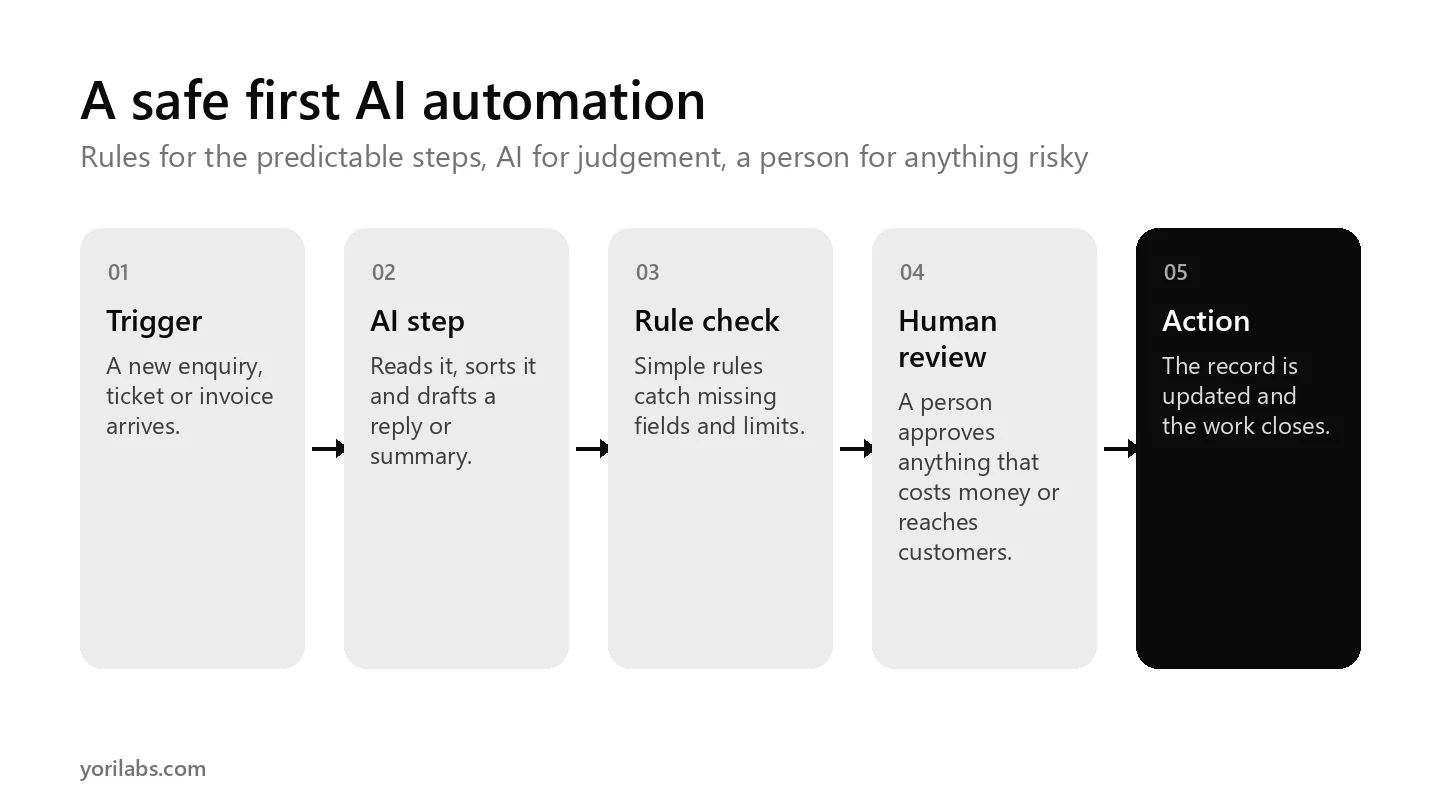
The common thread is simple. Rules handle the predictable steps, and AI handles the parts that need reading, judging or writing.
Rule based automation vs AI automation
| Rule based automation | With AI added | |
|---|---|---|
| Handles | Structured data in a fixed format | Emails, chats, PDFs, images and free text |
| Decides by | If this, then that | Reading the content and judging it |
| Breaks when | The format changes | The case is unusual or the AI gets it wrong |
| Needs | Clear rules | Clear rules, plus checks on the AI's output |
Swipe the table sideways to see every column.
Business examples that pay off quickly
- Lead handling: a new enquiry arrives, AI reads it, scores it and routes it to the right salesperson with a short summary.
- Support triage: incoming tickets are sorted by topic and urgency, and routine questions get a drafted answer for an agent to approve.
- Document extraction: invoice numbers, amounts and dates are pulled from PDFs into your accounting sheet.
- Ad reporting: daily numbers from several ad platforms are combined, and AI writes a plain summary of what changed.
- Content tagging: product listings or support articles are tagged and grouped so they're easier to find.
Each one takes a repetitive job off someone's plate, and each one is easy to measure in hours saved.
How to start with AI automation
- Pick one workflow, one job. Choose something repetitive that happens many times a week.
- Write down the steps a person follows today, including where they use judgement.
- Automate the predictable steps with rules first, and add AI only where judgement is needed.
- Keep a human review step for anything that sends money, messages customers or can't be undone.
- Measure time saved and errors for a month before you build the next one.
Most teams build their first workflows in tools like n8n, Zapier or Make. Our comparison of n8n alternatives explains how each one charges, which matters once volumes grow.
Risks to plan for
- Wrong answers. AI can misread a message or invent a detail, so check its output, especially early on.
- Data privacy. Know what customer data you're sending to which AI service, and keep it to what's needed.
- Hidden costs. AI model usage is often billed on top of the automation tool, so watch both bills.
- Nobody owns it. Every workflow needs a named person who fixes it when it breaks.
When automation becomes an AI agent
A single workflow follows a path you designed. An AI agent decides its own next step within limits you set, and an agentic system coordinates several agents toward a goal. Our explainer on AI agent vs agentic AI covers the difference, and our AI agents page shows the kind we build for sales, support and operations.
Questions to answer before you build
- What happens today? Write down every step a person takes, and how long each one takes.
- Where's the judgement? Mark the steps that need reading, deciding or writing. Those are where AI can help.
- What could go wrong? List the mistakes that would cost money or upset a customer, and add a check for each.
- What data does it touch? Note any personal or payment details, and keep them out of the AI step if you can.
- Who owns it? Name the person who'll fix it when it breaks, and how they'll find out.
- How will you measure it? Pick one number, such as hours saved a week, before you start.
Frequently asked questions
What is AI automation in simple words?
It's using AI to do parts of a job that used to need a person's judgement, such as reading a message, pulling details from a document or drafting a reply, inside an automated workflow. Rules handle the predictable steps, and AI handles the messy ones, with a person checking anything important.
What is an example of AI automation?
A common one is lead handling. When a new enquiry arrives, AI reads it, decides how promising it is, writes a short summary and routes it to the right salesperson on email or WhatsApp. Another is support triage, where tickets are sorted by topic and routine answers are drafted for an agent to approve.
Is AI automation the same as RPA?
Not quite. Robotic process automation repeats fixed digital steps, like clicking, copying data or moving files, and it breaks when the format changes. AI automation adds the ability to read and judge unstructured content, such as emails and documents, so it can handle work that strict rules can't describe.
How much does AI automation cost?
It depends on the tool, how often the workflow runs and how much AI it uses. You'll usually pay for the automation platform, such as n8n, Zapier or Make, and separately for AI model usage. Start with one workflow and track both bills against the hours it saves your team.
Will AI automation replace my team?
For most businesses it removes repetitive tasks rather than whole jobs. People still set the rules, handle unusual cases and approve decisions that cost money or touch customers. The best results come when the team decides which parts of their work to hand over, and keeps ownership of the outcome.
Want a workflow that saves your team hours?
We design and build AI automation and AI agents for businesses, alongside performance marketing for fintech, gaming, ecommerce and subscription apps. If there's a task your team repeats every day, and we'll suggest a first workflow.
tell us what it is