
WhatsApp marketing
WhatsApp Marketing Sample Messages, and the Rules That Decide If They Get Sent
Every WhatsApp marketing sample below is ready to adapt, and each one is labelled with the template category WhatsApp expects. Before you copy any of them, read the four rules in the next section. On WhatsApp, a well written message that breaks the rules simply doesn't get delivered, or it gets your number blocked.

On this page
We've written these for the kinds of brands we work with: fintech, gaming, ecommerce and subscription apps, plus D2C stores and service businesses.
Four rules to know first
These come from Meta's WhatsApp Business Platform documentation.
- Get opt in first. Businesses must have permission before messaging people on WhatsApp, as Meta's guide to getting opt in explains. Under the November 2024 policy update the opt in can be general rather than WhatsApp specific, as long as you follow local laws. Make it clear what people will get and how to stop it.
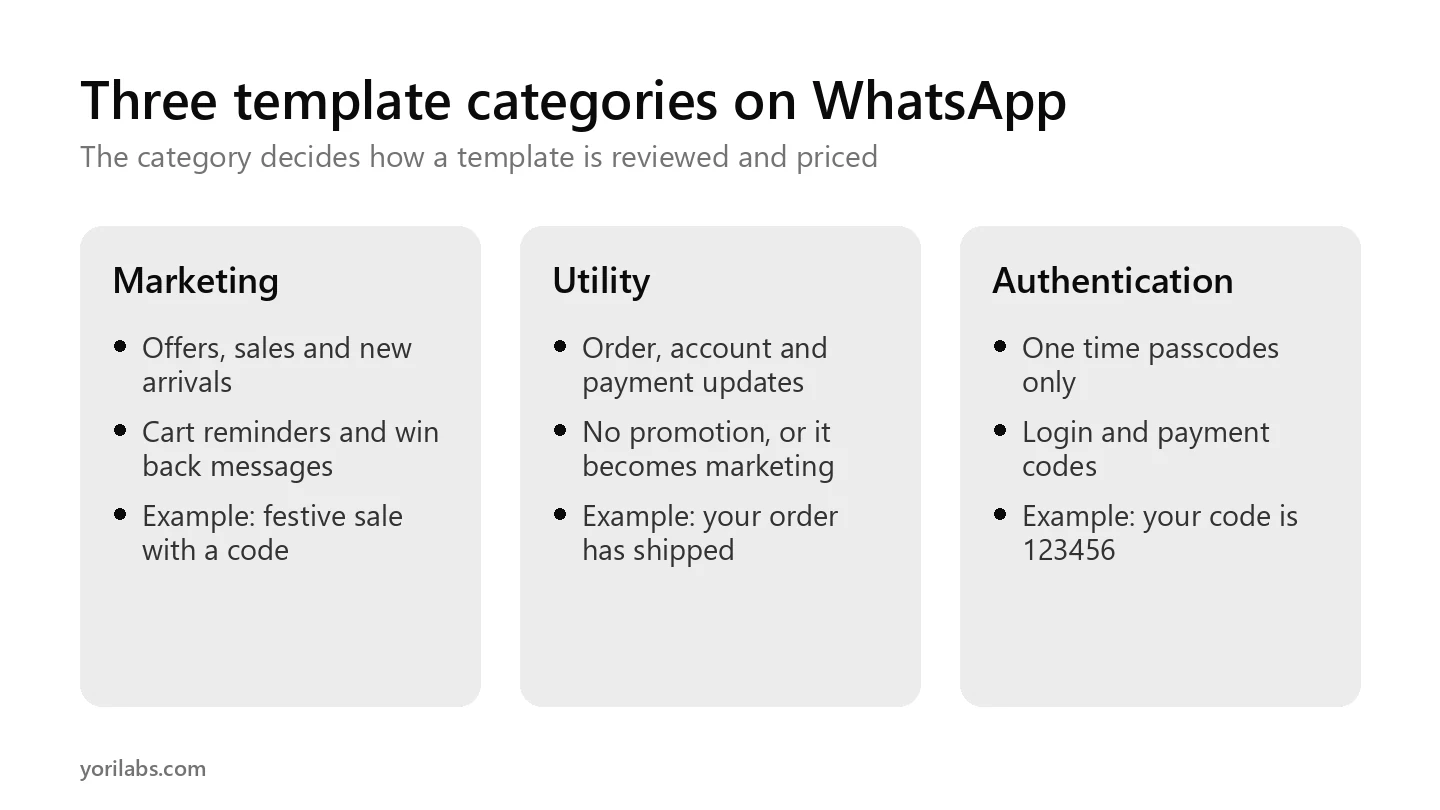
- Every template has a category: marketing, utility or authentication. The category affects how the message is reviewed and priced. Marketing covers offers, sales, reminders to buy and win back messages. Utility covers order updates, account alerts and opt in confirmations, with no promotion. Authentication is for one time passcodes only.
- Outside a customer service window, only templates can be sent. If a customer hasn't messaged you recently, you need an approved template to start the conversation. Meta's template overview covers how they're built.
- Miscategorised templates get moved. Since 9 April 2025, if you submit a template as utility and WhatsApp decides it's marketing, it's approved as marketing, as set out in Meta's template categorization rules. Adding a discount to an order update makes it marketing.
Two more facts matter. People can stop receiving marketing messages from a business, and they can block or report you, which hurts your number's quality. Fewer, more relevant messages beat bulk blasts.
12 WhatsApp marketing sample messages
Text in double braces is a variable you fill in for each customer.
| Sample | Category | Message |
|---|---|---|
| New arrival | Marketing | Hi {{name}}, our {{new_collection}} just landed. You told us you like {{category}}, so here's a first look before it's on the homepage. Tap below to see it. |
| Festive sale | Marketing | {{festival}} sale is live! Get {{discount}}% off on {{category}} till {{end_date}}. Use code {{code}} at checkout. |
| Hinglish festive offer | Marketing | {{name}} ji, {{festival}} ki shopping abhi shuru karo! {{category}} pe {{discount}}% off, sirf {{end_date}} tak. Code: {{code}} |
| Cart reminder | Marketing | You left {{items}} in your cart, {{name}}. We've saved them for you. Complete your order here: {{link}} |
| Back in stock | Marketing | Good news, {{name}}! {{product}} is back in stock in your size. It sold out fast last time. Tap below to grab it. |
| Renewal with an offer | Marketing | Your {{plan}} ends on {{date}}. Renew this week and save {{discount}}. Tap below to renew in one step. |
| Win back | Marketing | We miss you, {{name}}! Here's {{offer}} on your next order, valid till {{date}}. Reply STOP if you'd rather not hear from us. |
| Event invite | Marketing | You're invited: {{event_name}} on {{date}} at {{location}}. Seats are limited. Tap below to save yours. |
| Welcome after opt in | Utility | Thanks for opting in, {{name}}! You'll now get order updates and account alerts from {{brand}} on WhatsApp. Reply STOP anytime to opt out. |
| Order shipped | Utility | Your order {{order_number}} is on its way. Tracking number: {{tracking_id}}. Expected delivery: {{date}}. |
| Feedback on an order | Utility | We delivered your order {{order_number}}. How did it go? Tap below to rate it. It takes 20 seconds. |
| Payment reminder | Utility | Reminder: your payment of {{amount}} for {{service}} is due on {{date}}. Tap below to pay securely. |
Swipe the table sideways to see every column.
Notes on the trickier samples
- Cart reminders are marketing. Meta lists them as retargeting, which is marketing even when the user asked for them.
- Keep the welcome message free of offers. Add a discount and it becomes marketing.
- Surveys count as utility only when they're tied to a specific order or interaction. A general "rate us" message is marketing.
- The Hinglish sample is still marketing. Language doesn't change the category; the content does.
Tips that keep each WhatsApp marketing sample working
- Personalise beyond the name. Use what the customer bought or browsed.
- One message, one action. Give one button and one link.
- Send fewer, better messages. Blocks and reports lower your number's quality.
- Always give a way out. Honour opt outs quickly.
- Measure purchases, not opens. Track what each template leads to on your site or app.
If you're still choosing a platform to send from, our guide to WhatsApp Business API providers in India covers what Meta charges and what providers add. And when replies start piling up, AI automation can sort and answer the routine ones, the kind of work our AI agents handle for businesses.
Frequently asked questions
What is a WhatsApp marketing message?
It's a message sent from an approved WhatsApp marketing message template, and it promotes something: an offer, a new product, a reminder to buy or a message that wins back a lapsed customer. WhatsApp puts these in the marketing category, which is reviewed and priced differently from utility and authentication messages.
Do I need permission to send WhatsApp marketing messages?
Yes. WhatsApp requires businesses to get opt in before messaging people, and to follow local laws. Tell people what kind of messages they'll receive and how to stop them, then honour every opt out quickly. People can also block or report you, which lowers your number's quality and can limit how much you're able to send.
What is the difference between marketing and utility templates?
Utility templates update customers about something they've already started, like an order, an account or a payment, with no promotion in them. Marketing templates promote or win people back. A utility template with an offer added is treated as marketing, and since April 2025 WhatsApp can approve it as marketing instead.
Can I send OTPs with a marketing template?
No. Only authentication templates can be used to send one time passcodes. They're built for that single job, and WhatsApp reviews them separately from marketing and utility messages. If you need to send a login or payment code, set up an authentication template rather than adding the code to any other message.
How many WhatsApp templates can a business create?
Per Meta's documentation, a business portfolio that isn't verified can have up to 250 templates per messaging account. A verified portfolio, where at least one WhatsApp account has a business phone number with an approved display name, can have up to 6,000. Most brands need far fewer than that.
Want WhatsApp to drive sales, not blocks?
We help fintech, gaming, ecommerce and subscription brands turn messaging into a measured channel, judged on purchases rather than opens. If you'd like help planning your templates and journeys, and who you'd like to reach.
tell us what you sell